M1 Pro MacBook Pro H.265 Hardware Encoding with ffmpeg: videotoolbox vs libx265 Benchmark
After installing ffmpeg on my M1 Pro MacBook Pro, I ran a benchmark to test the Mac’s hardware encoding capabilities. This article compares H.265 hardware encoding via hevc_videotoolbox against software encoding with libx265, looking at speed, image quality, and file size.
Test Environment
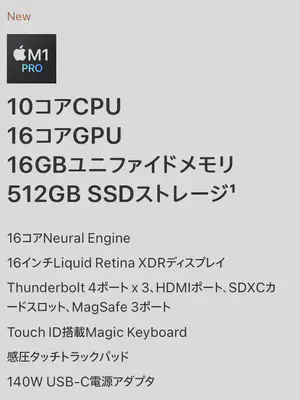
Tested on a 16-inch MacBook Pro with M1 Pro.
Mac Hardware Encoder: videotoolbox
On macOS, ffmpeg uses videotoolbox for hardware-accelerated encoding. It is available when ffmpeg is built with --enable-videotoolbox. The Homebrew build of ffmpeg includes this by default.
To verify which codecs support hardware acceleration:
ffmpeg -codecs | grep tool
 DEV.LS h264   H.264 / AVC (encoders: libx264 libx264rgb h264_videotoolbox )
 DEV.L. hevc   H.265 / HEVC (encoders: libx265 hevc_videotoolbox )
 DEVIL. prores Apple ProRes (encoders: prores prores_aw prores_ks prores_videotoolbox )
The H.265 hardware encoder is hevc_videotoolbox.
Test 1: hevc_videotoolbox (Default Settings)
The test source is a 4K (3840×2160) video clip shot at night at the Kohoku Interchange on the Daisankeihan Expressway.
ffmpeg -i 第三京浜\ 港北インターチェンジ-最大4K.mov \
  -c:v hevc_videotoolbox \
  hevc_videotoolbox_default.mp4
Result:
frame= 1548 fps= 52 q=-0.0 Lsize= 22975kB time=00:00:51.66 bitrate=3642.7kbits/s speed=1.72x
speed=1.72x — a 51-second 4K clip encoded in about 30 seconds. Faster than real time.

The file size reduction is dramatic.
Default Settings: Image Quality

The quality is proportional to the small file size — noticeably hazy. Fast-moving scenes would likely show more obvious artifacts.
Test 2: hevc_videotoolbox with Fixed Quality (-q:v 50)
hevc_videotoolbox supports the -q:v option (range 0–100, higher = better quality) to encode at a fixed quality level. This option was enabled for Apple Silicon in a specific ffmpeg commit: ffmpeg commit efece44. For more context, see this Stack Overflow discussion on optimally using hevc_videotoolbox.
ffmpeg -i 第三京浜\ 港北インターチェンジ-最大4K.mov \
  -c:v hevc_videotoolbox \
  -q:v 50 \
  hevc_videotoolbox_q50.mp4
Result:
frame= 1548 fps= 52 q=-0.0 Lsize= 174735kB time=00:00:51.66 bitrate=27703.6kbits/s speed=1.73x
Speed is virtually unchanged at speed=1.73x. File size is considerably larger, though.

Fixed Quality (q=50): Image Quality

Since the scene does not have large amounts of global motion, there are virtually no artifacts. A genuinely good result.
Test 3: libx265 (Software Encoding)
For comparison, I also ran the software encoder.
ffmpeg -i ./第三京浜\ 港北インターチェンジ-最大4K.mov \
  -c:v libx265 \
  -crf 28 \
  -preset fast \
  libx265.mp4
Result:
frame= 1548 fps=3.5 q=32.9 Lsize= 24886kB time=00:00:51.66 bitrate=3945.5kbits/s speed=0.116x
speed=0.116x — a 51-second clip took about seven and a half minutes to encode.


File size is comparable to the default hevc_videotoolbox output, but the image quality is noticeably better.
Comparison Summary
| Encoder | Speed | File Size | Quality |
|---|---|---|---|
| hevc_videotoolbox (default) | 1.72x | ~22 MB (small) | Poor — hazy output |
| hevc_videotoolbox (-q:v 50) | 1.73x | ~171 MB (large) | Good — usable quality |
| libx265 (-crf 28 -preset fast) | 0.116x | ~24 MB (small) | Excellent — high fidelity |
Hardware encoding is approximately 15x faster than software encoding. CPU utilization during hardware encoding stayed at roughly 30–50%, leaving the system responsive for other tasks.
Recommendations by Use Case
- Streaming, quick exports →
hevc_videotoolbox -q:v 50: fast with acceptable quality - Quality-critical archiving →
libx265 -crf 28: small file with excellent quality, worth the wait - Maximum speed, size reduction only →
hevc_videotoolbox(default): quality compromise required
The M1 Pro’s videotoolbox handles 4K real-time encoding with headroom to spare. Matching the encoder to your use case is the key to getting the best outcome.

Tomokatsu Yukishita (雪下 智且)
Engineering Manager / Real Estate Transaction Agent
Engineering manager connecting embedded development with cloud and AI. I apply quality standards from mission-critical systems to modern product and development workflows.